Graphify started with a great idea and became popular fast. The problem is that its Python/NetworkX architecture does not scale well. It installs about 30 direct dependencies, and the CLI reloads the entire graph into memory for every query. On a large repo, that can make each search slow enough to drag down an agent’s entire task.
ctx graph is a rewrite in Rust. It keeps the graph indexed in SQLite, so searches query the database directly and updates only touch changed files. Static indexing and search run as one native binary with no Python environment, API key, model, or background service.
If you aren’t familiar with Graphify, it’s like a local version of Sourcegraph: it builds a graph of your codebase and docs so an agent can ask who calls something, what depends on it, and what might break if it changes.
You might not need ctx graph or Graphify for a smaller project. Agents are surprisingly good at getting around a codebase using normal read and search tools. On a larger project, ctx graph gives them a much faster way to follow relationships across files instead of spending tokens repeatedly searching the repository.
If you train coding models, try giving ctx graph to the agents in your rollouts.
Try it
From any project:
ctx graph index .
ctx graph stats
ctx graph search authenticate
Replace authenticate with a symbol from your project, then copy its exact ID into an impact query. That shows the symbol, the code that depends on it, and the relationship between them:
$ ctx graph impact 'python:src/auth.py:authenticate@64'
Generation 1 (indexed snapshot)
python:src/auth.py:authenticate@64  function  authenticate  src/auth.py:4
python:src/auth.py:login@136         function  login         src/auth.py:7
python:src/auth.py:login@136 --calls--> python:src/auth.py:authenticate@64
ctx graph saves the graph at .graf/index.db. After changing code, update only what changed:
ctx graph updateUse --json for structured output and an exact node ID when a name is ambiguous. The usage guide covers callers, callees, paths, filters, reports, exports, multiple projects, and supported inputs.
Why ctx graph is better than Graphify
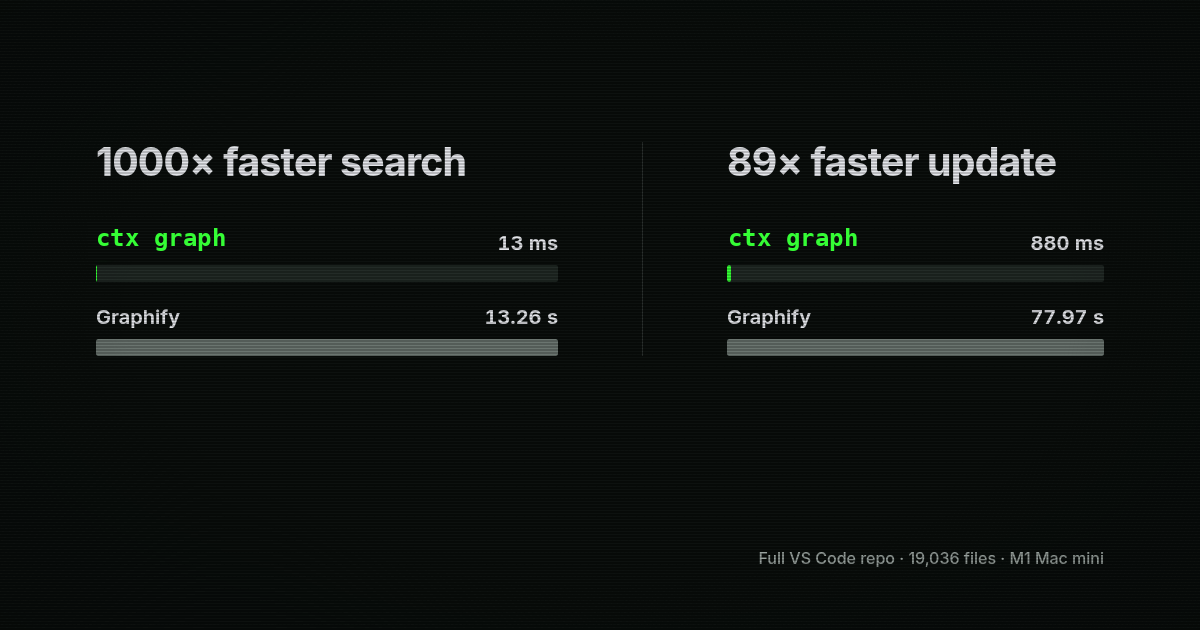
ctx graph is Graphify, but rebuilt properly in Rust: 1000x faster search, 89x faster updates, and one native binary.
It is also stricter about correctness. Updates become visible as one complete generation, so a failed extraction cannot publish half a graph. When two symbols could be the answer, ctx graph returns the ambiguity and the source evidence instead of guessing.
ctx graph is an independent implementation, not a fork or a drop-in replacement for Graphify's Python API. The chart uses the complete 19,036-file VS Code repository on an M1 Mac mini. Cold indexing was effectively tied, while ctx graph produced 2.4x as many nodes and 1.7x as many edges with 31% less peak memory. See the benchmark method, results, and tradeoffs.
Migrate from Graphify
Existing .graf/index.db databases work with ctx graph; no conversion is required.
Use ctx graph --help for the full command set.
Use ctx graph with an agent
Use ctx integrations install skill and ctx integrations install mcp --agent codex.
Optional project graph tool hooks use ctx graph install --platform gemini --project PATH (or claude or codebuddy); remove them with ctx graph uninstall and the same selections.